 SiteLauncher®
Speed Dial Extension for Chrome
As seen on CNET, BBC Click, LifeHacker, DemoGirl and many more …
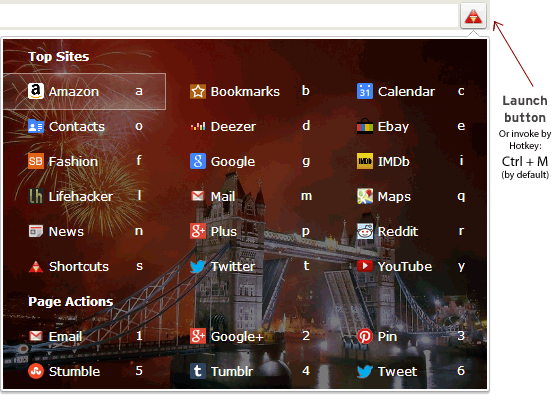
SiteLauncher is a free, fast and super-sleek "speed-dial" extension for Google Chrome that gives you lightning-fast and unobtrusive keyboard shortcut based tap access to your favorite top sites (opening by mouse and touch are also supported of course). When you want to open a site just click SiteLauncher's red triangle toolbar icon or press the keyboard hotkey (Ctrl + M by default) to bring up the Launcher—the keyboard shortcut driven speed-dial panel with all your pre-configured favorite top sites—you can then access one of your top sites by its unique keyboard key or by mouse/touch click.
• Set shortcuts to all your favorite sites and web-apps—any place that has a URL
• Open shortcuts by keyboard, mouse or touch—speed dialing on steriods
• Choose a theme and layout that suits you—free and premium themes available; including ability to use your own images as a background for the Launcher.
Usage examples: Speed dial to Facebook by hitting, Ctrl + M then F or speed dial to Google by pressing Ctrl + M then G. And of course you can setup similar keyboard shortcuts to any websites you wish and edit or delete the built-in defaults.
Pro tip: many prefer to change the Launcher hotkey from Ctrl + M default to Ctrl + Space instead, instructions on how to do this are included inside the extension's Help tab.
Privacy commitment—SiteLauncher is spyware free. SiteLauncher stores and works with your data locally on your computer, it is not sent to any web-app or other remote service. The only outbound traffic SiteLauncher sends is web requests directly to the websites you add as shortcuts - this is done in order to retrieve their respective icons for display. As with all Google Chrome extensions; SiteLauncher auto-updates to the latest version periodically, this is a process handled directly between Google Chrome and the Google Chrome Webstore.
SiteLauncher is subject to our terms of service and privacy policy.
Features & Benefits
- The Launcher gives you a quick and beautiful way access to your favorite sites and web-apps
- Includes number of beautiful free themes with premium themes available to buy.
- The Shortcut Manager makes it easy to add, edit and remove shortcuts. Each shortcut can point to any site, web-app, webpage you wish—if it has a URL you can make a shortcut to it.
- Option to set a keyboard letter to each shortcut gives you super-fast keyboard navigation from the Launcher—you don't even need to hit Enter!
- Cloud ready if you want it—shortcuts are stored as special bookmarks and are therefore automatically kept in sync across multiple computers should you opt to use Google Chrome's bookmark syncing feature.
- The Shortcut Group feature enables you to put related shortcuts together in order to make quick visual scanning of your shortcuts easy.
- Security and privacy—the SiteLauncher extension does not monitor, collect or transit any personal data about you, ever. We promise to keep it that way in future as well.
- Advanced user feature Support for bookmarklets—with "favicon" fetched from first site referenced in bookmarklet. Bookmarklets are special coded bookmarks that enable you to perform various actions, usually tied in with a specific site (such as "gmail this", "share on tumblr", "tweet this", etc). These bookmarklets are usually made available by the sites themselves, and can be added to SiteLauncher by inserting into the URL field when adding a shortcut.